 Month
Month
 Month
Month
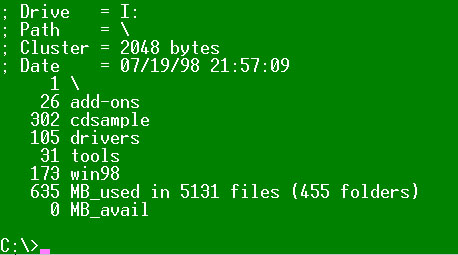
This is the second of a multi part lecture on checking the space on your hard drive, etc. Continuing from last month, severals methods will be presented for determining disk space on a Windows 95 or 98 computer using the FAT32 disk structure. This section is designed to use the command window in windows9X or winNT.
Object: To inventory all file space used on a hard drive and display a sorted list of the top level sub directories and the total space occupied under each one. This is now a 32 bit application. Enhancements include the use of computed cluster sizes. (compiler: Microsoft VC++ 5.0 )
"Random Access" questions start at 7:30 Tuesday night. See you there.
See SOURCE CODE links below.
int main(int argc, char **argv)
    {
    char root[_MAX_PATH] = "\\", mytime[20], mydate[20];

    if (argc==1) { puts(VERSION); return 1; }

    _strdate(mydate); _strtime(mytime);

    CDiskInfo Homedrive;		// save startup info
    CPathInfo Target(argv[1]);		// parse command line argument


    // Attempt to change to new drive and check that is was successful.
    //
    if (Target.DKnumber <= 26) _chdrive(Target.DKnumber); // 1=A, 2=B, ...
    if (Target.DKnumber != _getdrive())
	    { puts("+++ Disk Selection Error +++\007"); return 2; }

    if (*Target.dir) strcpy(root,Target.dir);	// adjust root starting point

    CDiskInfo *Newdrive = new CDiskInfo();	// store info about new drive
    gCluster = Newdrive->Cluster;		// save value in global varable

    printf("; Drive   = %c:\n",		Newdrive->DKletter  );
    printf("; Path    = %s\n",		root		    );
    printf("; Cluster = %ld bytes\n",   Newdrive->Cluster   );
    printf("; Date    = %s %s\n",	mydate, mytime	    );

    search(root);				// Do a RECURSIVE file search

    printf("%6ld MB_used in %ld files (%ld folders)\n",
			    megabytes(Gsize), gFileCount, gFolderCount	);
    printf("%6ld MB_avail\n", (Newdrive->KBavail >> 10)			);

    delete Newdrive;			// Restore original settings.
    return 0;
    }